A Weavatrix productv0.1.0MPL-2.0
Reclaim your workstation without losing your workspace.
SweepLoom is a developer-aware resource manager. It finds build output, package caches, Xcode and Docker leftovers, forgotten helpers and the always-on context your agents carry, then reclaims space through a plan you review. It never kills the chat you are in.
$ cargo install --locked --git https://github.com/Weavatrix/sweeploom sweeploom- Local-first
- No telemetry
- No LLM on classify or apply
- Rust
- Cursor · 43 proc · 7.3 GBKeep
- MCP · attachedKeep
- terminal
- vite · dev server
- Claude Code · idleKeep
- Codex · cargo / rustcKeep
- mcp-server · no live agent parentOptional
- ~/.claude/history.jsonl · archive · 0 tokInspect
- ~/.claude/AGENTS.md · always-onKeep
- ~/.claude/skills · capped · idle 30d+park?
- app/target · rebuild is cheapSAFE
Numbers you can re-run
- tokens
- 16,288tokens
always-on estimate on the gold store, where billing History as prompt gives 965,000
- kept
- 6 / 6kept
idle 2 GB agents stay Keep; a naive “free RAM” agent would kill all six
- deleted
- 0deleted
files removed when apply is called with confirm=false
- classified
- 30 / 30classified
gold names, about 2 µs per call, no LLM involved
Fixed fixtures asserted in tests, captured 2026-09-14. Re-run with sweeploom bench. They measure classification policy, not provider-billed tokens. Why that distinction matters.
What it finds
Everything a developer machine accumulates, sorted by whether it still earns its keep.
Three questions, answered locally: what is sitting on disk, in RAM and in the agent host; is it still earning its keep; and how do you reclaim it without losing the workspace.
- CLIMCPApp
Generated build output
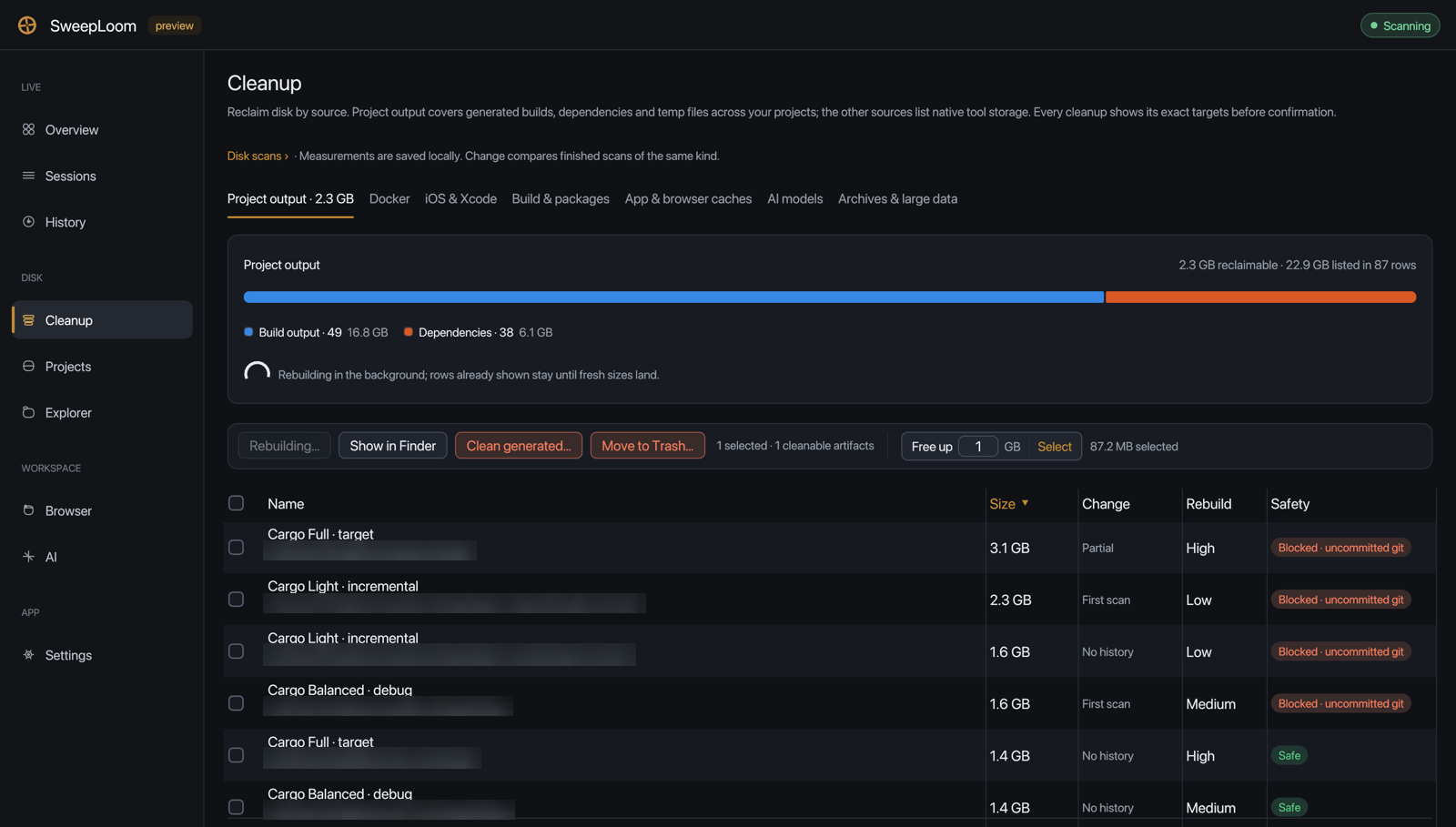
Rebuildable artifacts inside your projects, attributed to the workspace that owns them, with the rebuild cost next to the size.
target/ · node_modules/ · Python generated output
- CLIMCPApp
Live sessions
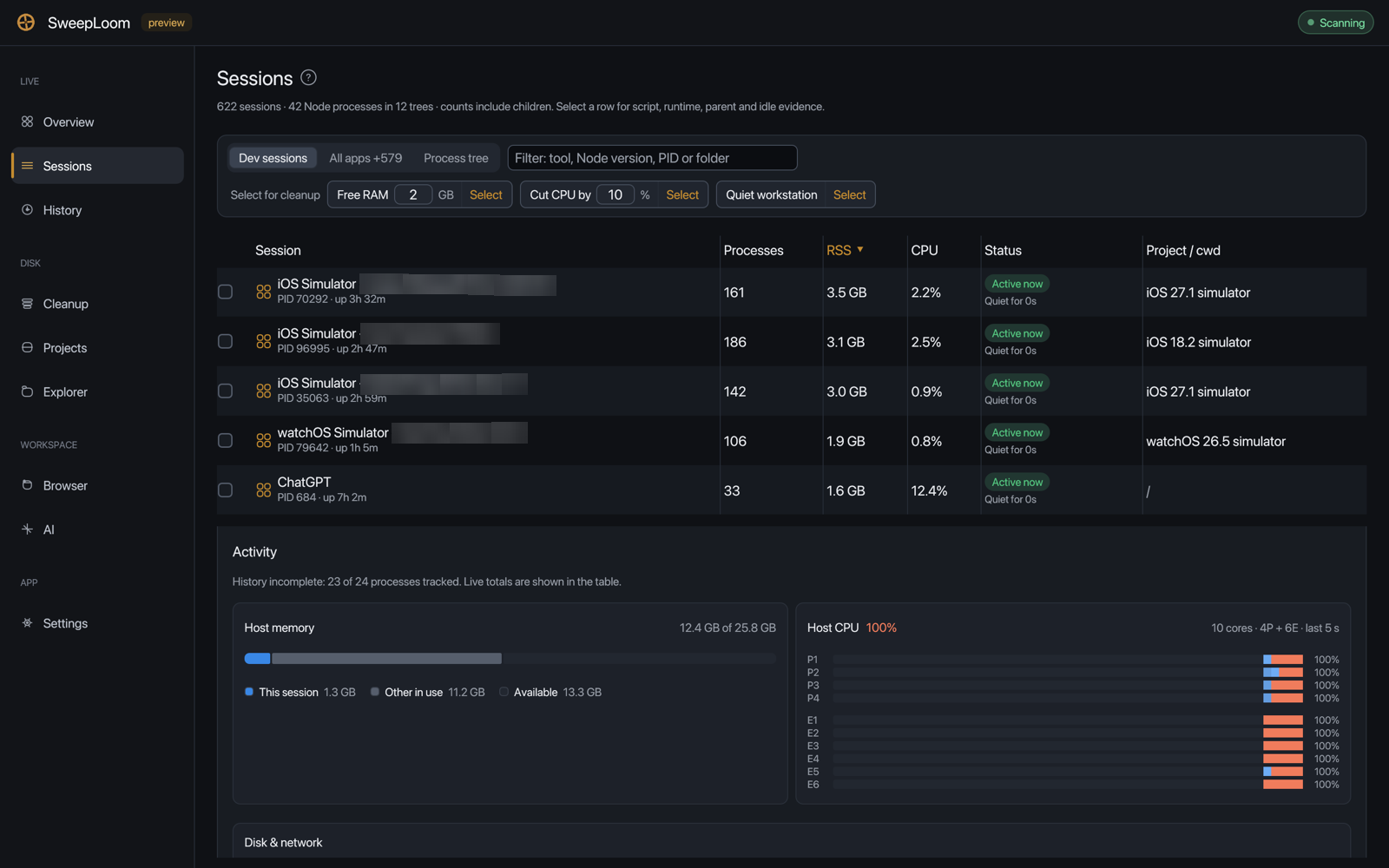
Processes grouped into the trees you actually run: an agent, its MCP servers, its terminals and dev servers. Idle agents are Keep.
Claude Code · Codex · Cursor · OpenCode · Gemini · Grok · MCP · dev servers
- CLIMCPApp
Always-on prompt tax
Estimated tokens for the files an agent host injects every turn. History on disk counts as zero. Secrets and SQLite are never opened.
AGENTS.md · *.mdc · rules · skills · plugins
- CLIMCPApp
Projects
Source heat and artifact heat per project, Git state, and artifact offers such as a Cargo target with its rebuild cost.
ActiveNow · Hot · Warm · git dirty / clean · cargo Target
- CLIMCPApp
Browser pressure
Real RSS and CPU per browser. Tab ages come from the optional companion extension and are never guessed. Unknown is shown as unknown, not zero.
Edge · Chrome · Firefox · lastAccessed via companion
- App
Package & tool caches
Download caches for the toolchains you use, measured in the background and offered as generated cleanup.
npm · pnpm · Yarn · Bun · pip · uv · Poetry · Cargo · Gradle · NuGet · Go · Homebrew · Playwright · SwiftPM
- App
Xcode & iOS Simulator
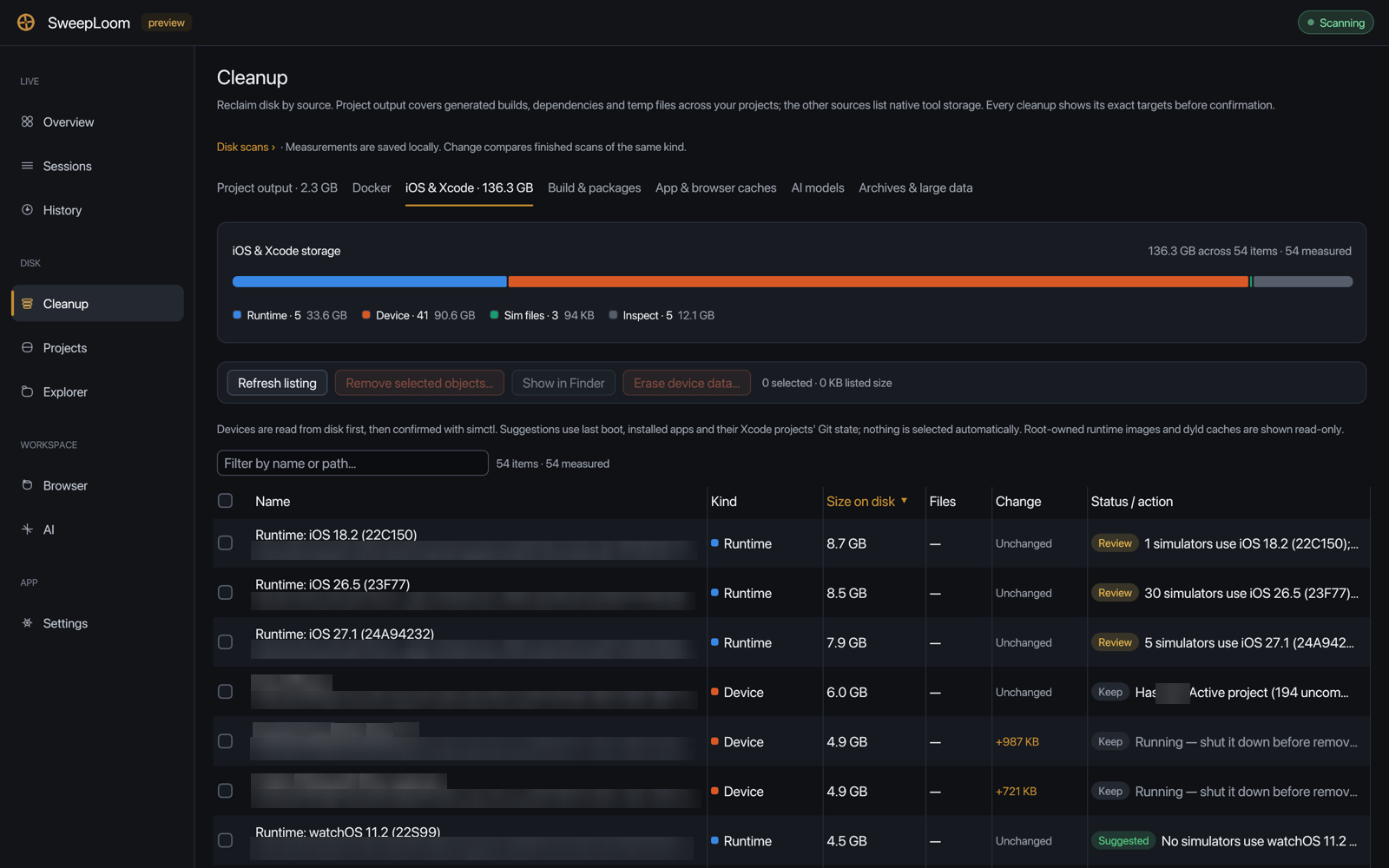
DerivedData by project, device support by OS version, simulator devices and removable runtimes through simctl, with running-device checks.
DerivedData · iOS DeviceSupport · simctl delete · simctl runtime delete
- App
Docker
Individual images, stopped containers, unused volumes and old build cache, removed through native Docker operations. In-use objects are protected.
images · stopped containers · unused volumes · build cache
- App
AI models
Local model downloads, itemised per model or repository. Ollama models are removed through Ollama's own local API.
Ollama · Hugging Face · LM Studio · PyTorch · Whisper · Core ML
- App
Archives & large data
User data that is not regenerable is never treated as cache. It is shown with its consequence and moved to Trash only if you choose it.
Xcode archives · device backups · large downloads · logs · Rust toolchains · Node versions
How apply is gated
Nothing is deleted without plan, revalidate, execute, receipt.
Review is the product. The same four steps run whether a person types --apply, an agent calls apply_cleanup, or you confirm in the desktop app.
- 01
Plan
SweepLoom lists what it found. SAFE generated rows are pre-selected; inspect-only rows are shown as BLOCKED and cannot be applied.
- 02
Revalidate
Right before anything is removed, each row is checked again. If you rebuilt target/ after the plan, that row is skipped, not forced.
- 03
Execute
Only what you agreed to: --apply on the CLI, confirm=true with explicit ids over MCP, a confirmation in the desktop app.
- 04
Receipt
Every apply returns what happened: deleted, skipped because it changed, failed. Nothing is silent.
$ sweeploom clean .[x] 1.2 GB cargo target[x] 812.0 MB node_modules[ ] 12.0 KB something inspect-only BLOCKEDdry-run; pass --apply to delete pre-selected SAFE rows after revalidation $ sweeploom clean . --applyreceipt=1 deleted=2 skipped_changed=0 failed=0Lines SweepLoom does not cross
- No terminate tool in the CLI or MCP. Live agents and their attached MCP servers stay Keep.
- Secrets, SQLite databases and History are inspect-only. Secrets are never opened.
- AGENTS.md, *.mdc and rules are inspect-only. park? is advice; alwaysApply is never flipped.
- No LLM on classify or apply. Classification is local and deterministic.
- A recommendation never overrides a safety blocker.
- Processes are keyed by PID plus start time, so a recycled PID is never mistaken for yours.
- Command lines are redacted (--token values, URI credentials) before UI, logs or receipts.
- No tokio, hyper or reqwest on the CLI path; cargo-deny bans them.
Three ways in
A CLI for hands, MCP for agents, a desktop app for review.
One engine behind all three. On the CLI, --apply is consent. Over MCP, apply needs confirm=true. In the app, a person confirms.
$ sweeploom sessions # what is alive, grouped by agent$ sweeploom sessions --quiet # dry-run plan; never a kill$ sweeploom scan . # what is on disk in this tree$ sweeploom projects . # heat, Git state, artifact offers$ sweeploom ai # AI stores and always-on token tax$ sweeploom browser # browser pressure; tabs via companion$ sweeploom bench # with vs without, fixed gold store$ sweeploom clean . # look first$ sweeploom clean . --apply # then delete SAFE generated rowsNo path means your home directory; pass . for the current tree. Session plans such as --quiet, --free-ram 4 and --reduce-cpu 20 are dry runs: terminate is not offered on the CLI.
sweeploom clean . printing no generated candidates is a valid answer. SweepLoom does not invent junk.
{ "mcpServers": { "sweeploom": { "command": "sweeploom", "args": ["mcp"] } }}$ claude mcp add -s user sweeploom -- sweeploom mcp| Tool | Writes |
|---|---|
list_sessionsLive session trees with Keep / Optional recommendations | no |
disk_inventoryWhat is on disk under a root, with categories (metadata only) | no |
list_projectsProject kinds, source and artifact heat, Git state | no |
list_ai_storesAI tool stores, classes and always-on token estimates; never opens secrets or SQLite | no |
advise_contextAdvice for one leaf name: keep for Context such as AGENTS.md, empty for History; never writes | no |
cleanup_candidatesReviewable cleanup rows (dry run); SAFE generated rows pre-selected | no |
explain_candidateOne row in detail before anyone agrees to it | no |
list_browserBrowser pressure; tabs null when unknown | no |
apply_cleanupRevalidate and delete the agreed ids; returns a receipt | yes, if confirm |
$ git clone https://github.com/Weavatrix/sweeploom.git$ cd sweeploom$ cargo run --release -p sweeploom-guiA native Rust app (egui) for Windows, macOS and Linux with nine tabs, light and dark themes, a quiet tray icon on Windows and macOS, and scans that keep running while you look elsewhere. On macOS, build the signed app bundle so folder permissions survive updates.
Tour all nine tabsThe desktop app
A local reviewer, not a dashboard you have to trust.
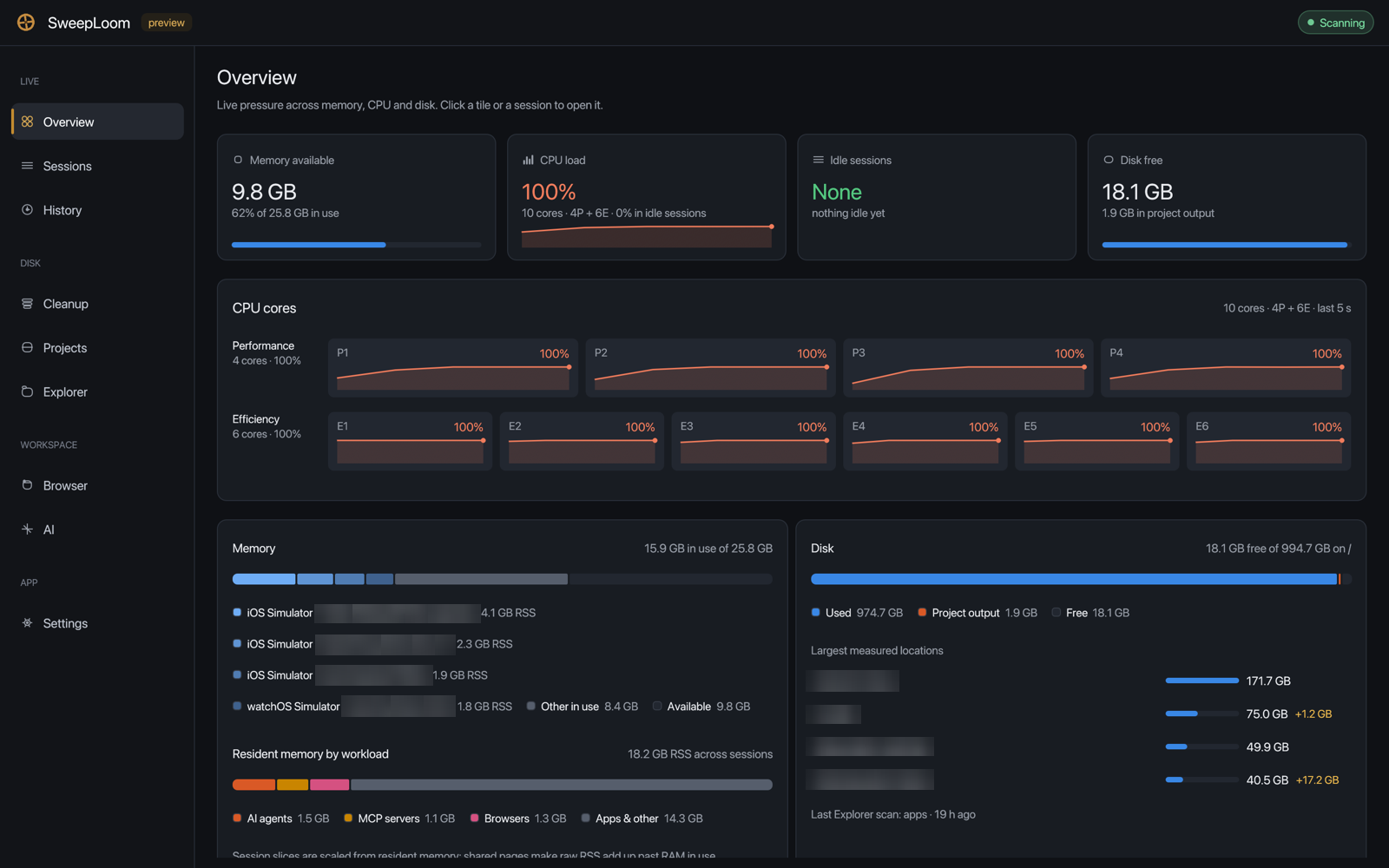
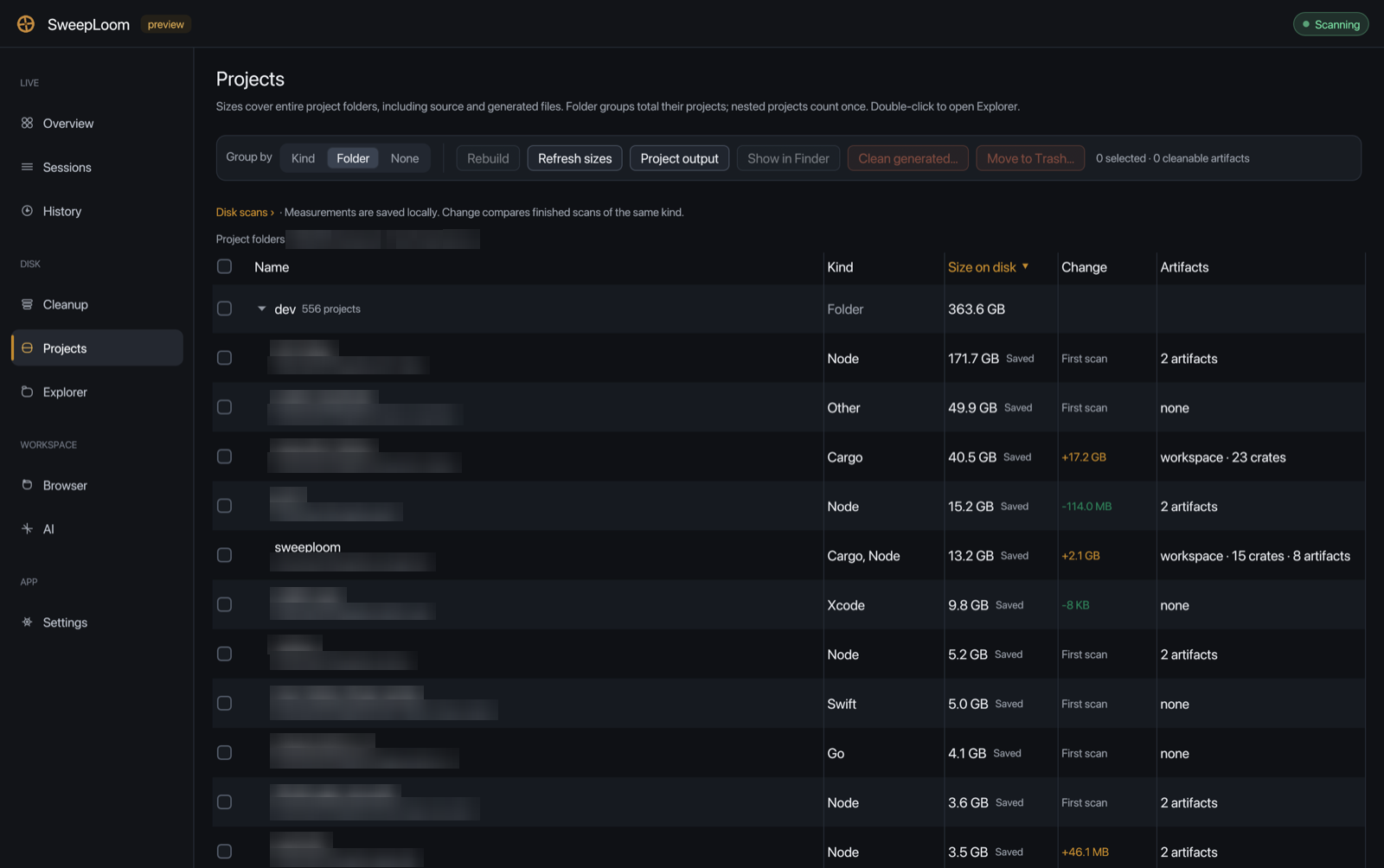
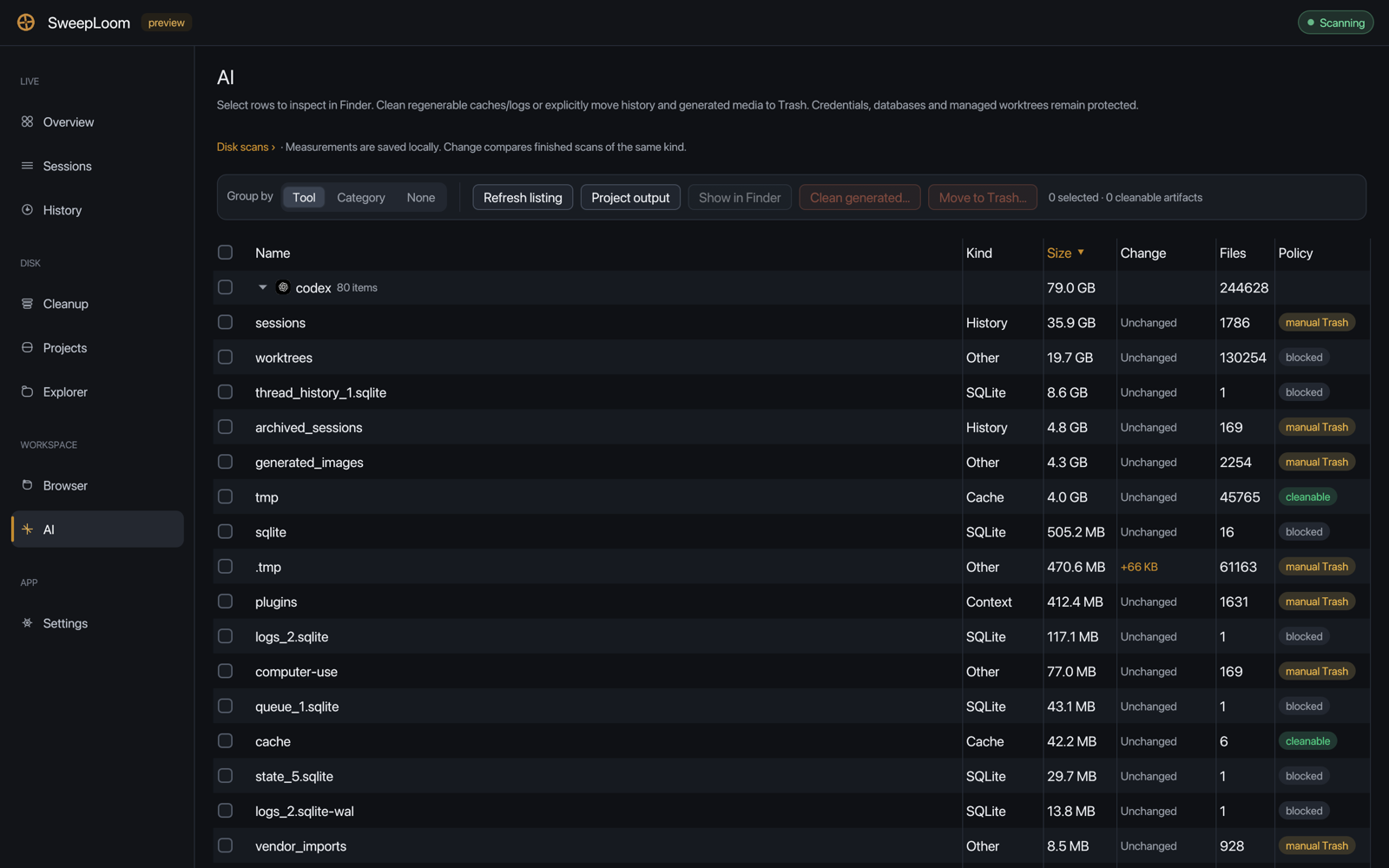
Nine tabs: live pressure, disk and your workspace. Every cleanup row shows its origin path or native object ID, size, change since the last scan, and the consequence of removing it.
Honest scope
What SweepLoom is not.
Not a RAM booster
It will not “kill idle Cursor to free 8 GB”. RSS is reported as a sum, not as reclaimable memory, and live agents stay Keep.
Not a context compressor
It estimates the always-on prompt tax of rules, skills and plugins. It does not intercept model requests or shrink what an agent reads. For budgeted repository evidence, see the separate Cortex Loom project.
Not an AI that decides what to delete
Classification is deterministic Rust, in microseconds. An LLM would add seconds and thousands of tokens to the one path that must be predictable.
Not a cloud service
No account, no sync, no telemetry. The desktop app is a local reviewer; agents use MCP over stdio.
From the blog
Notes on reclaiming space safely.
A tour of the desktop app: nine tabs, one safety model
SweepLoom's desktop app was redesigned around nine tabs: Overview, Sessions and History for live pressure; Cleanup, Projects and Explorer for disk; Browser and AI for the workspace; and Settings. What each tab shows, what changed in this release, and the rules every destructive action follows.
Read →Inside SweepLoom: sixteen crates and no async runtime
A tool that deletes files should be boring on the inside. How SweepLoom's workspace is split into crates, which invariants every crate keeps, why cargo-deny bans tokio, hyper and reqwest, and how the desktop app scans in parallel with nothing but std threads and channels.
Read →How SweepLoom finds every project on your machine, and got about 3× faster
Project discovery used to start from the folder the app was launched in. Now it covers every developer folder with fair per-folder budgets, walks on bounded worker threads, and streams rows as they finish. It found 598 projects where the old walk found 237, in less time. How it works, the numbers, and the limits.
Read →
FAQ
Questions people ask first.
Will SweepLoom kill my idle Cursor, Claude Code or Codex session?
No. Idle Claude Code, Codex, Cursor, OpenCode, Gemini and Grok sessions are Keep, and so are MCP servers attached to them. Killing a live agent drops the chat you were trying to make cheaper. The CLI and MCP have no terminate tool at all; the desktop app only stops a session when a person explicitly confirms it.
Can an AI agent delete files through the MCP server?
Only through apply_cleanup with confirm: true, after review tools have listed the rows, and only for SAFE generated rows. Without confirm=true the call is refused and deletes nothing. The bundled Codex skills tell the agent to list, explain, ask, and pass exactly the ids you agreed to.
Which coding agents can use it?
The docs cover Claude Code, Cursor, Claude Desktop and Codex, and any host that launches stdio MCP servers can run sweeploom mcp the same way. Codex also gets a plugin with review skills. Setup for each host is on the MCP page.
Does SweepLoom send anything over the network?
No telemetry, no account, no update checks. The CLI and MCP server make no network requests. The desktop app's only network use is a local Ollama server on 127.0.0.1:11434, to list and remove models, and the browser companion talks only to a local process. The upcoming Mac App Store edition makes no network connections at all. See the privacy policy.
Is the 16,288 token figure a promise that my agent gets cheaper?
No. It is a fixed policy fixture: a whole-store dump versus SweepLoom's capped always-on estimate. It is not provider billing. A live coding-agent run on 2026-09-15 found no coding-task token saving, and we publish that result next to the fixtures.
Which platforms are supported?
The CLI, MCP server and library are tested on Windows, macOS and Linux in CI. The desktop app runs on all three; the tray icon is available on Windows and macOS. Xcode and iOS Simulator cleanup is macOS-only, naturally.
Why is it not on crates.io or npm yet?
Packages are coming soon. Today you install from source with Cargo in one command; see Download.
What does it cost?
The full edition costs nothing: it is open source under the Mozilla Public License 2.0 (see License). A sandboxed Mac App Store edition is coming soon for USD 1.99; it is in TestFlight testing and not on sale yet.
What's the difference between the App Store edition and the free edition?
The App Store edition is the same desktop app built for Apple's App Sandbox. It works only inside folders you grant in the macOS folder picker, makes no network connections and starts no other programs. That rules out Sessions and stopping processes, Docker, Simulator devices and runtimes, the browser companion, Ollama models, Rust toolchains and the CLI and MCP server, which stay in the free full edition you build from source. Apple handles the purchase and refunds. The comparison table has the details.
Look first. Then apply.
Install the CLI and MCP server from source, point your agent host at sweeploom mcp, and ask it what is safe to remove.
$ sweeploom clean .$ sweeploom clean . --apply